Order templates
Use this when you have routes that repeat regularly, for example a vehicle leaving the warehouse for deliveries at 8 a.m. every morning. Turn on the schedule once, and the system creates orders automatically on each run day. You do not need to create orders by hand every day.
Create a new template
Templates are not created directly on this page. To create one:
Enter the route and choose the vehicle and service as for a normal Truck B2B order. See Truck B2B.
Choose the run days and the order creation time, then create the order.
Template list
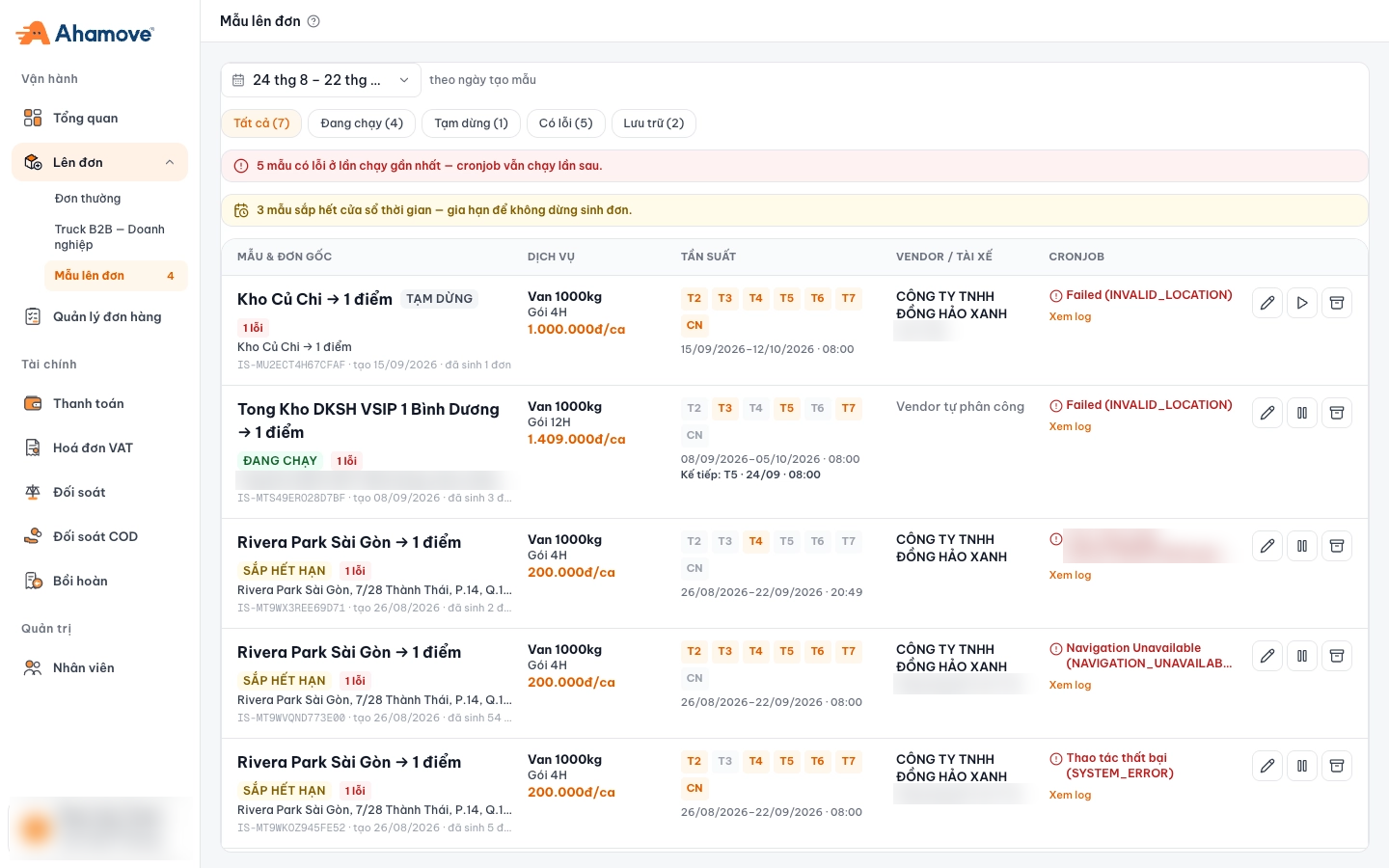
- Date range, filters by template creation date
- Filter by status, with template counts
- Warning: templates with errors on the last run
- Warning: templates whose time window is about to end
- Template name, status label and error count
- Service: vehicle type, shift package, price per shift
- Frequency: run weekdays, duration, order creation time
- Last cronjob result · Xem log (View log)
- Edit · Pause / Resume · Archive
The list is filtered by template creation date. Cannot find an older template? Widen the date range. The number next to Mẫu lên đơn (Order templates) in the left menu is the number of templates that need attention.
What does each template include?
| Column | Content |
|---|---|
| Mẫu & đơn gốc (Template & original order) | Route name (e.g. Kho Củ Chi → 1 điểm (Cu Chi warehouse → 1 point)), status label, error count, origin, template code, creation date and number of orders generated |
| Dịch vụ (Service) | Vehicle type (e.g. Van 1000kg), shift package (4H, 12H…) and price per shift |
| Tần suất (Frequency) | Run weekdays (T2 → CN, Mon → Sun; highlighted days are run days), template duration, order creation time, and Kế tiếp (Next): the next run |
| Vendor / Tài xế (Vendor / Driver) | Fixed transport vendor and driver, or Vendor tự phân công (Vendor assigns) |
| Cronjob | Result of the last run, with Xem log (View log) |
Template statuses
Filter quickly with the buttons at the top of the page: Tất cả · Đang chạy · Tạm dừng · Có lỗi · Lưu trữ (All · Running · Paused · Has errors · Archived), each with a template count.
| Label on the template | Meaning |
|---|---|
| Đang chạy (Running) | The template is creating orders on schedule |
| Tạm dừng (Paused) | Paused manually, not creating orders |
| Sắp hết hạn (Expiring soon) | The template's duration is about to end; extend it |
| N lỗi (N errors) | Number of recent runs that failed |
| (filter) Lưu trữ (Archived) | Templates no longer in use, put away |
The three action buttons at the end of each row: Sửa mẫu (Edit template) · Tạm dừng (Pause) (for a paused template it is Tiếp tục (Resume)) · Lưu trữ (Archive).
Check the warnings every morning
1. "… mẫu có lỗi ở lần chạy gần nhất" (… templates had errors on the last run) Click Xem log (View log) to see why. The cronjob still runs normally next time, but the order for the failed day will not be created. You need to place a make-up order for that day yourself.
2. "… mẫu sắp hết cửa sổ thời gian" (… templates are about to reach the end of their time window) Extend them before the expiry date. Once expired, a template stops generating orders, with no notification.
Common errors
The Cronjob column shows the error from the last run. Click Xem log (View log) for details.
| Error shown | Common cause | What to do |
|---|---|---|
Failed (INVALID_LOCATION) | An address in the template is invalid | Click Sửa mẫu (Edit template) and pick the address again on the map |
Navigation Unavailable (NAVIGATION_UNAVAILABLE) | The route could not be calculated | Check the points in the route again; if the error persists, contact Ahamove |
Thao tác thất bại (SYSTEM_ERROR) | A system error on that run | Place a make-up order for the failed day; if it keeps happening, contact Ahamove |